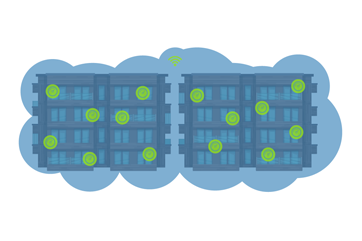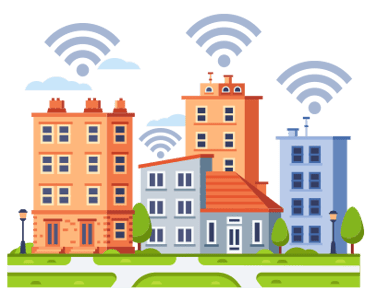


In multi-dwelling units (MDUs) aka Multi-Family housing such as apartment buildings, condos, and student housing, reliable internet has shifted from a perk to a utility essential for work and life. For property managers, reliable MDU managed WiFi prevents the operational headache of constant complaints and resident turnover.
Recent AI-driven sentiment research analyzing more than 30,000 apartment units confirms this shift. Residents increasingly treat internet reliability as foundational infrastructure, not an optional amenity, and consistently link poor connectivity with frustration, stress, and lease reconsideration. (Wi-Fi Sentiment Analysis)
Dense living environments present unique connectivity hurdles. Physical obstructions, signal interference, and device density create problems that standard home networking advice cannot solve. This guide covers how to diagnose root causes, optimize performance through regular WiFi health checks, and secure your network against evolving threats.
Understanding WiFi Challenges in MDUs
MDU networks face performance pressures distinct from single-family homes. With the shift toward remote work and high-bandwidth streaming, these structural challenges require proactive management.
Resident sentiment research shows that while users rarely talk about cabling or infrastructure directly, they increasingly associate “good WiFi” with fiber-powered or fiber-backed networks, often referencing fiber explicitly when describing ideal connectivity. (Wi-Fi Sentiment Analysis)
Three primary factors degrade signal quality in these environments:
- Device Density: Dozens, sometimes hundreds, of devices compete for airtime and bandwidth on shared infrastructure.
- Signal Interference: In tight quarters, signals from neighboring units often overlap (co-channel interference), degrading performance even when signal strength appears high.
- Construction Materials: Steel beams, elevator shafts, concrete walls, and fire doors absorb or block RF signals more aggressively than residential drywall.
What Causes WiFi Dead Spots in Apartments?
Dead spots usually stem from physical barriers or improper hardware placement. Large appliances, mirrors, and dense building materials (like concrete or brick) can create "shadows" where signals cannot reach. Furthermore, routers tucked inside closets, utility panels, or behind heavy furniture struggle to project a usable signal across a unit.
While most resident devices connect via WiFi or Ethernet, strong performance depends on fiber-backed data closets feeding those access points, ensuring consistent throughput and signal stability throughout the building.
Why Does WiFi Keep Dropping in My Building?
Intermittent dropouts often indicate network congestion or channel conflict. When router buffers fill up during peak hours, packets drop, causing video calls to freeze or streams to buffer. This is compounded by the rapid addition of Internet of Things (IoT) devices and appliances, which crowd the wireless spectrum. Every environmental change, like a new tenant, a new router, or even a new microwave, alters the RF environment.
Sentiment analysis shows that residents are far more sensitive to outages than speed. In fact, residents reporting recurring WiFi outages are significantly more likely to consider moving, with churn rates increasing sharply as outages become more frequent. (Wi-Fi Sentiment Analysis) Reliability failures are remembered; stable connections fade into the background.
Overloaded Apartment WiFi and Device Management
A single two-bedroom unit may house multiple residents operating laptops, phones, 4K TVs, and gaming consoles simultaneously. Multiplied by 50 or 100 units, the demand on shared infrastructure becomes immense. Overloaded access points (APs) increase latency for everyone connected.
Practical steps for managing capacity:
- Band Steering: Push compatible devices to the 5GHz or 6GHz bands to free up the crowded 2.4GHz spectrum.
- Airtime Fairness: Configure APs to prevent older, slower devices from monopolizing network resources.
- Education: Encourage residents to disconnect devices they are no longer using.
Interference from Neighboring Networks
In MDUs, you aren’t just managing your own traffic. You are competing with every router within range. If multiple APs broadcast on the same channel, they must take turns talking, slashing network speed. Professional site surveys help identify clear channels and allow managers to adjust transmit power, minimizing overlap between units.
How DojoNetworks Designs Around These Challenges
At DojoNetworks, these issues are not surprises, as they are the realities of designing WiFi for multi-dwelling environments. Device density, RF interference, roaming challenges, and building materials are all accounted for from day one when our networks are engineered.
Rather than reacting to performance problems after deployment, DojoNetworks designs MDU networks intentionally to avoid these common pitfalls through proper access point placement, capacity planning, channel strategy, and continuous monitoring. This proactive approach helps ensure consistent performance, fewer resident complaints, and a network that scales as usage grows.
When and Why to Audit Your MDU’s Network with a WiFi Health Check
Don't wait for a total outage to assess your network health. If support tickets are trending upward, or residents report slow speeds during specific times of day, an audit is overdue.
Regular audits identify hidden bottlenecks like misconfigured roaming settings or older APs acting as a drag on the system. Research indicates that residents prefer invisible reliability over responsive support, meaning prevention matters far more than fast troubleshooting once issues occur. (Wi-Fi Sentiment Analysis)
Signs It's Time for a WiFi Health Check
- Persistent Dead Spots: Areas where devices consistently disconnect or fail to roam.
- High Latency: "Laggy" connections even when download speeds appear normal.
- Recurring Complaints: Patterns of dissatisfaction from specific floors or building wings.
- Occupancy Changes: Significant turnover or increased building density.
The Benefits of Proactive Monitoring
Continuous monitoring offers visibility into error rates, throughput, and device health. Detecting a failing switch or a saturated AP days before residents notice allows maintenance teams to resolve issues quietly, reducing support costs and protecting the property’s reputation.
This aligns with resident feedback showing that satisfaction improves not when networks are fast, but when they are consistently dependable and interruption-free. (Wi-Fi Sentiment Analysis)

Diagnosing WiFi Problems: A Structured Approach
Troubleshooting MDU networks requires data, not guesswork. Use this checklist to isolate issues systematically.
MDU Network Audit Checklist
- Heat Mapping: Use survey software to visualize coverage gaps and signal leakage between floors.
- Capacity Planning: Inventory connected devices per AP to identify hardware bottlenecks.
- Firmware & Security Review: Verify all APs, switches, and gateways are running current, secure firmware.
- Physical Inspection: Check for APs that have been moved, blocked by furniture, or tampered with.
Advanced Diagnostic Tools
Basic speed tests often miss the nuance of RF environments. Professional spectrum analyzers visualize invisible issues, such as non-WiFi interference from baby monitors or security cameras. These tools generate detailed heat maps that highlight exactly where to add APs or adjust channel width.
WiFi Health Check Best Practices
Routine maintenance prevents the "break-fix" cycle. Schedule a thorough audit at least bi-annually. Update network diagrams to reflect any physical changes to the building or infrastructure. This documentation is vital for troubleshooting future issues quickly.
Firmware and Lifecycle Management
Outdated hardware is a security risk and a performance bottleneck. Schedule maintenance windows for firmware updates. Plan for hardware refreshes every 4–5 years to keep pace with new standards (like WiFi 6E and WiFi 7).
Resident Engagement
- Education: Provide "Tech Welcome Kits" explaining router placement and how to avoid interference.
- Self-Service: Offer a simple troubleshooting guide or status page, so residents know if an issue is building-wide or unit-specific.
Optimization Strategies for MDU Networks
To future-proof your network against increasing bandwidth demands:
- Channel Planning: Use Dynamic Frequency Selection (DFS) channels where available to access cleaner spectrum.
- Band Balancing: Aggressively steer dual-band devices to 5GHz to reduce 2.4GHz congestion.
- Roaming Optimization: Fine-tune RSSI thresholds, so devices hand off smoothly between access points as residents move through the building.
Integrating New Technologies
WiFi 6 and especially WiFi 7 were designed specifically for high-density environments. They handle simultaneous connections more efficiently than previous generations. If a full rip-and-replace isn't feasible, target upgrades in high-traffic common areas first.
Security Best Practices
- Isolation: Ensure resident networks are logically separated (VLANs), so devices in Unit 101 cannot see devices in Unit 102.
- Encryption: Enforce WPA3 or WPA2-Enterprise where possible.
- Management Access: Restrict administrative access to the network management plane.
Real-World Optimization in Action
Case A: The High-Rise Interference
A downtown property faced constant video call drops. An audit revealed routers were broadcasting at maximum power, causing severe co-channel interference between floors.
The Fix: Technicians lowered the transmit power on hallway access points and disabled low data rates. Resident complaints dropped significantly within days.
Case B: The Overloaded Common Area
A student housing complex suffered slow speeds in the study lounge. The audit showed hundreds of idle smartphones camping on the network.
The Fix: Implementing aggressive band steering and reducing the DHCP lease time freed up resources for active users.
Frequently Asked Questions (FAQs)
Next Steps
Consistent connectivity drives tenant satisfaction. Routine health checks uncover capacity issues and dead zones before they affect your bottom line. By using the right diagnostic tools and committing to emerging standards like WiFi 6E, property managers can future-proof their assets.
If your network is generating more tickets than compliments, use the checklist above to start your audit or contact us for help with a WiFi health check.